


Help My Truck
2.811.00 Reviews
App Specs
- Version
- 1.1.19
- Updated On
- License
- Free
- Downloads
- 10,000+
- Developer
- ALIAKRAFT SOLUTIONS LLC
- Categories
- Auto & Vehicles
- Platform
- Android
Screenshots
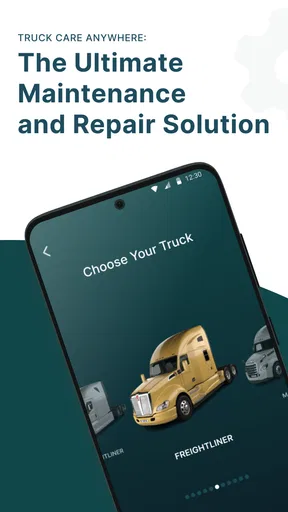

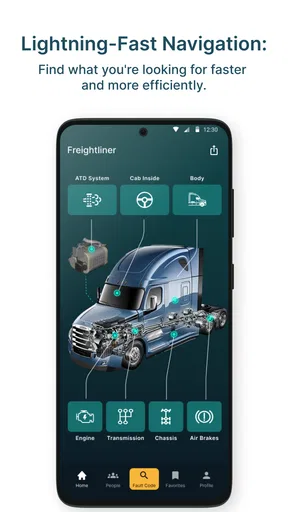
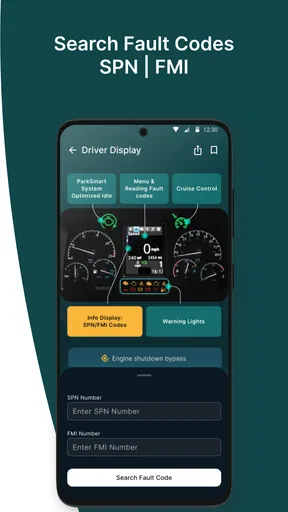
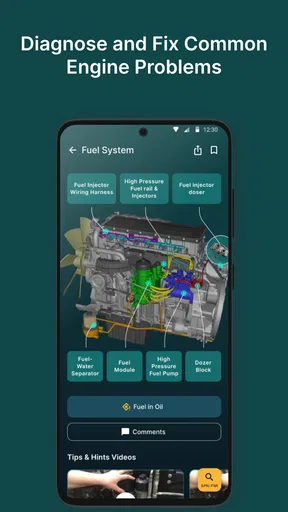
 Analysis by AppCompare
I judge a trucking app less by how impressive its feature list sounds than by whether I can use it calmly when plans change. That is the standard I brought to Help My Truck, an Auto & Vehicles app from ALIAKRAFT SOLUTIONS LLC. It is aimed at everyday road needs—finding assistance, fuel, and a place to pause—but the useful question is how well those jobs fit into a repeatable routine, rather than whether one screen can replace every tool a driver already relies on.
Start with one dependable routine
My practical approach would be to treat the app as a support tool, not as a reason to change a safe driving routine. Before setting off, I would check the route and likely stopping points while parked, then keep the phone somewhere accessible without handling it on the move. If a warning light appears or traffic disrupts the plan, the next step is to pull over safely before searching for a service or alternative route. That small habit matters more than any shortcut: a roadside app is only helpful if using it does not become another distraction.
Help My Truck brings several kinds of trip information together, including repair services, fuel locations, rest stops, and route guidance. That can save the mental effort of jumping between separate searches when a trip is already going sideways. It does not remove the need to verify that a result suits the vehicle, route, and immediate situation. A nearby workshop is not automatically equipped for every truck problem, and a listed stop is only useful if its access and facilities fit the driver’s needs.
What to check before relying on it
I would make a short pre-trip check part of using any navigation or roadside app: confirm that the planned destination is correct, look over the route while stationary, and decide what information would be useful if a problem arises. When comparing repair options, note the location and contact details you can see, and consider whether the service is reachable from a truck-friendly road. For fuel, distance alone is not enough; the sensible choice depends on the vehicle, the remaining range, and whether the stop lies along a practical route.
The app is free to download, has an Everyone content rating, and offers in-app purchases priced from $4.99 to $84.99 per item. I would keep that distinction in mind before committing to anything paid: first decide which task you need help with, then see whether the free experience covers it well enough. Its current version is 1.1.17, and it requires Android 8.0 or later. The app has a 2.9 average from 33 ratings, with 10 written reviews, so I would approach it with measured expectations rather than treating it as a proven essential.
Make common situations easier to handle
The strongest reason to keep a roadside companion installed is not that every drive will involve a crisis. It is that small disruptions are easier to manage when you already know where to look. For example, if the fuel warning comes on before a long, unfamiliar stretch, I would compare the nearby options while safely parked and choose a stop that makes sense for the whole route, not just the shortest distance. If a road closure appears, I would review the suggested alternative before following it, especially when driving a large vehicle through unfamiliar streets.
For a breakdown, I would use repair search as a way to identify possible help, then call or otherwise confirm the key details before setting off toward a service location. Describing the symptoms clearly and having the truck’s location ready can make that conversation more useful. This is a small but important distinction: finding a listing is the beginning of arranging assistance, not proof that a mechanic is available, equipped for the job, or able to reach you.
Worth Reading Before You Choose

Baby Panda World Brings Quick Play to Modern Phones, but Its Game Library Feels Busy

ESPN’s Live Game View Makes Following Close Games Easier

QuizzLand Review: A Good Fit for Short Trivia Breaks, Not Every Player

Basketball Stars: Multiplayer Is Fast, but Can It Recover When Matches Go Wrong?

WEBTOON Turns Phone Updates Into a Better Reading Routine

Link to Windows Runs on Shared Habits, Not Social Feeds
Where it fits among the usual alternatives
Drivers can assemble the same broad toolkit from a general navigation app, map searches, fuel-finding tools, and a separate roadside provider. Those alternatives may be preferable when a driver already trusts one app for live directions or has a dependable assistance service with a direct support process. Help My Truck’s appeal is the convenience of bringing several truck-related errands into one place; the trade-off is that a combined app should not automatically replace a specialist tool for a high-stakes task.
I would use it alongside, rather than instead of, the resources that matter most on a particular route. Keep a known roadside-assistance contact available if you have one, and use a navigation option you are comfortable checking before driving. For routine planning, a single place to look for fuel, rest stops, and repair possibilities can reduce app-switching. For a serious mechanical fault, a direct call to qualified assistance is more important than browsing a list for too long.
What is Help My Truck All About?
First off, Help My Truck is exactly what it sounds like—a virtual toolbox designed to assist truck drivers with their everyday needs. Whether you’re dealing with unexpected breakdowns or just need to find the nearest rest stop, this app has got your back. It's like having a mechanic, navigator, and a buddy all rolled into one.
Features That Stand Out
When I first fired up the app, the user-friendly interface immediately caught my eye. The design is intuitive, making it super easy to navigate even when you’re on the go. Let’s break down some of the key features:
- Real-time Repair Assistance: One of the most striking features is the app’s ability to connect you with nearby repair services. If you find yourself with a flat tire or an engine hiccup, you can quickly find help without any hassle.
- Route Optimization: This is a lifesaver. The app analyzes traffic, weather conditions, and even road closures to suggest the best routes, saving you time and fuel.
- Fuel Station Locator: Running low on fuel? No worries. The app provides a list of nearby fuel stations, complete with prices, so you can always find the best deals.
- Rest Stop Finder: We all need a break sometimes. The app helps you find the nearest rest stops, complete with reviews and amenities, making sure you’re always refreshed and ready to roll.
My Experience with Help My Truck
So, I decided to take Help My Truck for a spin on a recent trip. I was cruising down the highway when I noticed the low fuel light blinking. Instead of panicking, I opened the app and quickly found a fuel station just a few miles ahead with the best price in the area. Talk about a relief!
Later, I encountered a roadblock due to unexpected construction. The app instantly rerouted me, avoiding a potential hour-long delay. The real-time updates were spot on, and I have to say, the stress-free drive was a pleasant change.
What Could Be Better?
No app is perfect, right? While Help My Truck is packed with useful features, there are a few areas where it could improve. For instance, I noticed that in some rural areas, the repair service options were a bit limited. However, this is understandable given the sparsity of services in such regions.
Another thing I’d love to see is more community engagement. Adding a feature where truckers can share tips or reviews could enhance the user experience even further. It’s always great to hear firsthand from fellow travelers, don’t you think?
The Final Mile
All in all, Help My Truck is a solid app that delivers on its promises. It’s a handy companion for anyone spending long hours on the road, offering peace of mind and practical solutions when you need them most. Whether you’re a seasoned trucker or just starting out, this app is worth a download.
So, what are you waiting for? Hit the app store, give it a whirl, and let me know how it transforms your trucking adventures. Safe travels, and remember, the road is always better with a little help!
Who is likely to get the most from it?
I see the clearest fit for drivers who regularly travel unfamiliar routes and want a single starting point for several common decisions. A newer truck driver may find it useful to have repair, fuel, and rest-stop searches close together, while an experienced driver may value it as a backup when a familiar route changes unexpectedly. It is less compelling for someone whose routes are fixed, whose preferred stops and service contacts are already well established, or who expects a specialist dispatch service to handle every roadside issue directly.
It is also worth separating convenience from certainty. A fuel price or service result can help narrow choices, but I would still check whether the stop fits the vehicle and whether the information is current enough for the decision at hand. That extra pause is particularly worthwhile when a detour could send a truck onto a narrow road or into an awkward approach. The app can point toward an option; the driver still has to judge whether it is practical.
A more useful way to build familiarity
Rather than waiting for a breakdown to learn the interface, I would try the ordinary searches while parked on a routine trip. Look up a planned fuel stop or rest area, then see how the route information is presented and how quickly you can return to the main task. This low-pressure check helps reveal whether the app suits your habits before time pressure enters the picture. It also makes it easier to notice which details you need to verify elsewhere.
Experienced users can make the process more repeatable without relying on special features: use the same sequence each time. Check the route before departure, identify a sensible place to refuel or rest, and keep a clear plan for what to do if the truck develops a problem. When something changes, stop safely, search for the relevant help, and verify the result before acting. A consistent sequence reduces rushed decisions and makes a multi-purpose app easier to use than opening it without knowing what you need.
One trade-off is that a combined tool can encourage overconfidence. Seeing route guidance, service listings, fuel, and stops together may feel comprehensive, but each decision still has different consequences. A rest stop choice is not the same as choosing a repair provider, and a suggested reroute deserves extra scrutiny when truck size or road access matters. I would treat convenience as a way to organize the search, not as a substitute for professional judgment or a direct confirmation.
When I would choose another option
If I needed guaranteed roadside dispatch or had a serious mechanical issue, I would prioritize a known assistance provider or a direct conversation with a qualified repair service. If my main concern were turn-by-turn navigation, I would stick with the navigation tool I already trust and know how to operate safely. Help My Truck makes more sense as a practical companion for locating options across several everyday needs than as the one tool responsible for every part of a trip.
The rating is a reason to test it for yourself rather than assume it will suit every driver. The app has 10K+ installs, but popularity alone cannot show whether its coverage matches a particular route or whether its workflow feels dependable to you. I would install it before a trip, try the tasks I expect to use, and avoid making it my only plan until I have seen how it performs in the places I actually travel.
My bottom line for road use
My recommendation is a measured one: Help My Truck can be worth trying if you want roadside searches and basic trip support gathered in one app, especially when you often drive beyond familiar territory. Its value depends on treating results as leads to check, keeping safe habits first, and having a backup for urgent assistance. Drivers who want a guaranteed service relationship or a dedicated navigation system may be better served by their existing specialist options.
For me, the best way to use it is to prepare before the pressure starts: learn where the key searches are, review a planned route while parked, and keep the right contact or alternative available for problems that need more than an app listing. That makes the app a useful extra in the cab without asking it to do a job it cannot reliably do alone.
Pros
- User-friendly interface for easy navigation.
- Real-time GPS tracking for precise location.
- Comprehensive service options for trucks.
- 24/7 customer support for emergencies.
- Regular updates improve performance.
Cons
- Limited offline functionality for remote areas.
- Requires stable internet for optimal use.
- Some features locked behind paywall.
- Occasional bugs in older devices.
- High battery consumption during use.
FAQs for Help My Truck
What is Help My Truck and how does it work?
Help My Truck is a mobile application designed to assist truck drivers in managing their routes and maintaining their vehicles. The app offers features such as real-time traffic updates, route optimization, and maintenance reminders. By entering their vehicle details and destination, drivers can receive customized suggestions to improve efficiency and safety on the road.
Is Help My Truck available for both Android and iOS devices?
Yes, Help My Truck is available for download on both Android and iOS platforms. You can find it in the Google Play Store for Android devices and the Apple App Store for iOS devices. Ensure your device meets the app's system requirements for optimal performance before downloading.
Are there any subscription fees or in-app purchases in Help My Truck?
Help My Truck offers a basic version that is free to download, providing essential features for truck drivers. However, there are premium features available through in-app purchases or a subscription plan. These may include advanced route planning tools, enhanced traffic alerts, and priority support, allowing drivers to tailor the app to their specific needs.
How does Help My Truck ensure the safety and privacy of its users?
Help My Truck prioritizes user safety and privacy by employing robust security measures, such as data encryption and secure login options. The app also complies with data protection regulations, ensuring that personal information is handled responsibly. Users can review and adjust their privacy settings within the app to control data sharing.
Can Help My Truck be used offline or in areas with poor connectivity?
Help My Truck is designed to function optimally with an internet connection, as it relies on real-time data for traffic updates and route optimization. However, some features, such as saved routes and maintenance logs, can be accessed offline. It's recommended to check connectivity requirements for full functionality before relying on the app in remote areas.


